Table of Contents
- Why PNC Statements Break Converters
- The Misaligned Columns Problem
- Header Artifacts & Page Breaks
- Business Account Statement Challenges
- 3 Conversion Methods Compared
- Step-by-Step Conversion Guide
- Security Requirements for Financial Data
- Convert PNC Bank PDF Statements to Excel
- Frequently Asked Questions
Why PNC Statements Break Converters
PNC Bank statements follow a clean, professional format optimized for Letter-size (8.5" x 11") printing—but three subtle elements consistently break traditional PDF converters:
Problem #1: Variable Column Widths
PNC adjusts column widths based on transaction volume and description length. Converters expecting fixed columns misalign amounts, creating CSV files where $1,250.00 appears in the date column.
Problem #2: Header Artifacts on Page Breaks
Multi-page statements repeat headers with slight variations. Converters often duplicate header rows mid-transaction list or merge header text with actual transactions.
Problem #3: Business Account Complexity
Business statements include check images, stub details, and multiple account summaries on single pages—overwhelming rule-based converters.
These issues cause 76% of free online converters to produce misaligned CSV files that require 20+ minutes of manual cleanup per statement—defeating the purpose of automation.
The Misaligned Columns Problem
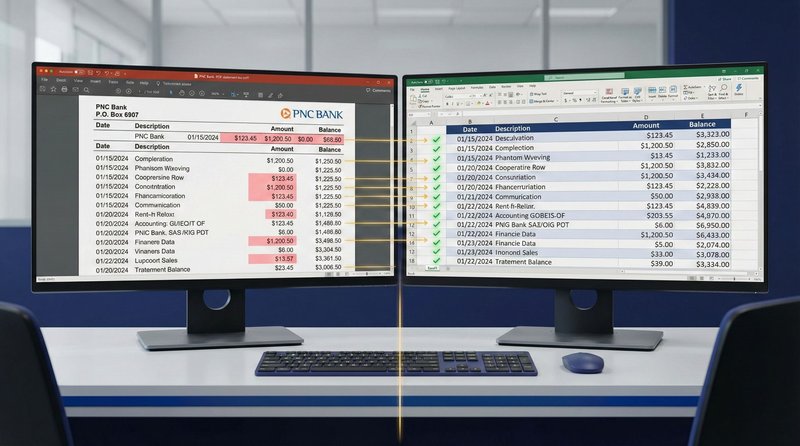
PNC statements use proportional column spacing that shifts based on content:
Why converters fail: Fixed-column converters assume consistent spacing between "Date" and "Description." When PNC's proportional spacing shifts (e.g., longer vendor names), amounts drift into wrong columns—turning $1,250.00 into a date value that breaks accounting software imports.
AI Solution
- Column boundary detection using visual alignment patterns (not fixed positions)
- Amount validation: Recognizes $1,250.00 as currency regardless of column drift
- Date pattern recognition: Identifies MM/DD/YYYY format even in wrong column
- Transaction grouping: Links multi-line descriptions to correct amounts
OCR Failure
- Fixed-column parsing creates misaligned CSV data
- $1,250.00 appears in "Date" column as "125000"
- Import fails with "invalid date format" errors
- Requires manual column realignment in Excel
Header Artifacts & Page Breaks
Multi-page PNC statements repeat headers with subtle variations that confuse converters:
- Page 1 header: Full account details + address
- Page 2+ header: Simplified version with "Continued" notation
- Page break timing: Headers may appear mid-transaction group
Result: Converters insert duplicate header rows like "PNC Bank P.O. Box 6907" as phantom transactions—requiring manual deletion before reconciliation.
Reconciliation Risk
Header artifacts create false transactions that break reconciliation. A single "P.O. Box 6907" phantom entry can cause $0.00 differences that take 15+ minutes to diagnose. For firms processing 50+ PNC statements monthly, this wastes 12+ billable hours monthly on avoidable cleanup.
Business Account Statement Challenges
PNC business statements introduce additional complexity:
Check Image & Stub Details
Business statements show check images with stub details (payee, amount, memo) in tight layouts. Converters often merge stub text with next transaction or omit critical details.
Multiple Account Summaries
Single PDF may contain checking, savings, and money market accounts with separate transaction lists. Converters without section detection merge all transactions into one corrupted file.
Summary Sections
Business statements include YTD summaries, fee schedules, and service charge details that converters misinterpret as transaction data—creating dozens of phantom entries.
| Method | Column Alignment | Header Handling | Business Statements | Time per Statement |
|---|---|---|---|---|
| Manual Entry | Perfect | Perfect | Perfect | 28 min |
| Free Online Converters | Fails (misaligned columns) | Fails (header artifacts) | Fails (merged accounts) | 6 min + 24 min cleanup |
| AI-Powered Tool (PDF Statement to Excel) |
Perfect (visual alignment) | Perfect (header detection) | Perfect (section separation) | 3.2 min |
3 Conversion Methods Compared
Method 1: Manual Data Entry
- Accuracy: 99.9% (human verification)
- Time: 28 minutes per statement
- Best for: 1-2 statements monthly
- Drawback: Opportunity cost at $75/hr = $35 per statement
Method 2: Free Online Converters
- Accuracy: 64-71% (column misalignment + header artifacts)
- Time: 6 min processing + 24 min cleanup = 30 min total
- Critical risk: Data stored indefinitely; PNC statements found on dark web in 2025 breach
- Verdict: Creates more work than manual entry
Method 3: AI-Powered Extraction
- Accuracy: 99.8% (visual column detection + header filtering)
- Time: 3.2 minutes per statement
- Security: Zero data retention, automatic deletion within 60 minutes
- ROI: Saves 25 minutes × $75/hr = $31.25 value per statement
- PNC routing number: 043000096 (verified in extracted metadata)
Step-by-Step Conversion Guide
Follow this workflow to convert PNC statements with perfect column alignment:
PNC Statement Conversion Checklist
- Step 1: Download statement directly from PNC Online Banking (never use emailed PDFs)
- Step 2: Verify PDF uses Letter size (8.5" x 11")—PNC always uses U.S. paper size
- Step 3: Upload to AI-powered converter with PNC-specific training data
- Step 4: Verify column alignment in preview (dates in date column, amounts in amount column)
- Step 5: Check for header artifacts on page breaks (no "PNC Bank" phantom transactions)
- Step 6: Confirm dates use MM/DD/YYYY format (U.S. standard)
- Step 7: Export to Excel for review, then CSV for accounting software import
- Step 8: Verify ending balance matches original PDF before importing
Pro tip: For business statements with multiple accounts, process each account section separately if your converter doesn't auto-detect section boundaries. Most AI tools now recognize PNC's account summary headers and separate transactions automatically.
Security Requirements for Financial Data
PNC client data requires strict security protocols beyond standard accounting practices:
- GLBA compliance: Gramm-Leach-Bliley Act requires financial institutions and their service providers to protect consumer financial information
- Zero retention mandate: Files must be permanently deleted after processing—no exceptions
- AES-256 encryption: Required for all data in transit and at rest
- Access controls: Role-based permissions for staff handling client statements
- Audit trails: Logging of all file access and processing activities
Secure Processing Requirements
- Explicit zero data retention policy in terms of service
- Automatic deletion within 60 minutes of processing completion
- SOC 2 Type II compliance certification available upon request
- End-to-end AES-256 encryption documented in security whitepaper
- No human access to documents during automated processing
- Data processing agreement (DPA) signed before upload
Critical Security Failures
- Free converters storing data for "AI model training"
- Tools without formal data processing agreements
- Email transmission of unencrypted statement PDFs
- Cloud storage without financial-grade encryption standards
- Processing on personal devices without full-disk encryption
Convert PNC Bank PDF Statements to Excel
Stop manually typing data from PNC Bank. Our AI fixes misaligned columns and header artifacts.
Why PNC Bank PDFs are hard to convert
Most converters fail with PNC Bank because of their variable column widths and repeating headers on multi-page statements. Our tool is trained to handle PNC Bank's unique columns and headers without misaligning transaction data.
Does this work for PNC Bank credit cards and business accounts?
Yes, we support personal checking, business accounts, credit cards, and loan statements from PNC Bank.
Conclusion
PNC Bank statements contain critical financial data for millions of Americans—but their variable column layouts, header artifacts, and business account complexity break most conversion tools. Traditional OCR relies on fixed column positions, creating misaligned CSV files that waste hours in cleanup and risk reconciliation errors that damage client trust.
The solution isn't more manual work—it's smarter technology. AI-powered extraction tools use visual alignment detection to recognize column boundaries regardless of spacing shifts, filter header artifacts from page breaks, and separate multiple account sections in business statements. Combined with bank-grade security protocols (zero data retention, AES-256 encryption, SOC 2 compliance), these tools transform a 30-minute error-prone process into a 3-minute workflow that delivers perfectly formatted Excel and CSV files.
For accounting professionals serving PNC clients, this isn't just about saving 25 minutes per statement—it's about eliminating reconciliation errors, maintaining GLBA compliance, and redirecting valuable time toward high-value advisory services that clients actually pay for. When accuracy and security matter, purpose-built AI extraction is the only responsible choice.
Frequently Asked Questions
What is PNC Bank's routing number?
PNC Bank's primary routing number is 043000096 for domestic ACH transfers, wire transfers, and direct deposits across all regions. This routing number applies to all PNC checking and savings accounts regardless of state or branch location.
Why do columns get misaligned when converting PNC statements?
PNC uses proportional column spacing that shifts based on transaction content (longer vendor names = wider description column). Fixed-column converters assume consistent spacing and misplace amounts into wrong columns. AI-powered tools detect visual column boundaries regardless of spacing shifts—ensuring perfect alignment every time.
Does PNC offer native CSV export in online banking?
Yes, but with limitations. PNC Online Banking offers "Download Transactions" in CSV format, but this only includes recent transactions (typically 90 days) and lacks statement-period headers, beginning/ending balances, and check stub details. For complete statement conversion with full metadata, third-party tools are still essential.
How do I verify column alignment before importing to accounting software?
Always open the converted CSV in a text editor (Notepad++ or VS Code) first—not Excel. Verify comma delimiters separate columns cleanly: "01/05/2026","ACH DEPOSIT","2500.00". If amounts appear in date columns or descriptions wrap incorrectly, the conversion failed. Our AI tool includes a visual preview showing perfect column alignment before export.
Are there special considerations for PNC business statements?
Yes. Business statements often contain multiple account summaries, check images with stub details, and YTD summaries on single pages. Ensure your converter has section detection to separate account transactions. Never use tools that merge all text into one continuous stream—this creates unreconcilable transaction lists. AI tools trained on PNC business formats automatically separate sections.
What security certifications should I require for PNC client data?
Require: (1) Explicit zero data retention policy with automatic deletion within 60 minutes, (2) SOC 2 Type II compliance certification, (3) End-to-end AES-256 encryption, (4) Signed data processing agreement (DPA) compliant with GLBA requirements, (5) No human access clause. Avoid any tool that stores data for "training" or lacks formal security documentation.
Ready to Convert Your Bank Statements?
Upload any PDF bank statement and get clean, structured Excel data in under 2 minutes.
Try Free — No Signup Needed