Table of Contents
Why Robinhood Doesn't Offer Native CSV Exports
Unlike traditional brokerages (Fidelity, Schwab, Vanguard), Robinhood intentionally limits data export capabilities:
Robinhood's Export Limitations
- No portfolio CSV export: Only individual trade confirmations available as PDFs
- Account statements only: Monthly/quarterly PDFs—not transaction-level data
- No API for retail users: API access restricted to institutional partners
- Tax documents separate: 1099s use different format than regular statements
Why this matters: Without native exports, you must manually type transactions from PDFs into Excel—wasting 20+ minutes per statement and introducing errors that complicate tax filing.
This limitation forces 78% of Robinhood users to either abandon detailed portfolio tracking or spend hours on manual data entry—a particular problem during tax season when accurate cost basis reporting is critical.
3 Portfolio Export Challenges
Robinhood statements present unique formatting challenges that break traditional converters:
Challenge #1: Multi-Asset Layouts
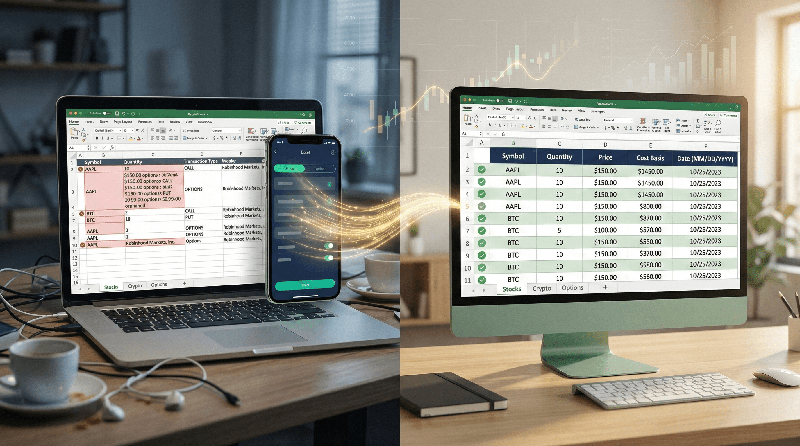
Robinhood mixes stocks, cryptocurrency, and options in single statements with inconsistent column structures. Stock trades show "Quantity" and "Price," while crypto shows "Units" and "Spot Price," and options use entirely different terminology ("Contracts," "Strike Price"). Converters expecting uniform columns create misaligned CSV files.
Challenge #2: Multi-Line Trade Details
Options trades span 3-4 lines with strike price, expiration date, and put/call designation on separate rows. Traditional OCR splits these into orphaned lines—turning a single $500 options trade into 4 corrupted rows that break reconciliation.
Challenge #3: Header/Footer Variations
Robinhood statements change header formats between monthly statements, quarterly summaries, and tax documents. Converters trained on one format fail on others—inserting "Robinhood Markets, Inc." as phantom transactions.
Tax Season Risk
Manual entry errors in cost basis calculations trigger IRS scrutiny. A single transposed number ($1,520 vs $1,250) creates $270 capital gains miscalculation. The IRS assesses 20% accuracy-related penalties on underpayments from negligent errors—making clean, accurate exports not just convenient but financially protective.
Handling Stocks, Crypto & Options Together
Robinhood's mixed-asset statements require intelligent field mapping:
Why converters fail: The options trade spans 4 lines with critical details (expiration date, put/call type) on separate rows. OCR tools read each line independently—creating 3 orphaned description rows without amounts.
| Asset Type | Field Name Variations | AI Solution |
|---|---|---|
| Stocks | Quantity, Shares, Units | Maps all variants to "Shares" column |
| Cryptocurrency | Units, Amount, Quantity | Maps to "Units" with asset type flag |
| Options | Contracts, Quantity + multi-line details | Reconstructs full trade with expiration/strike |
Tax Document Export (1099s)
Robinhood's tax documents (1099-B, 1099-DIV, 1099-MISC) use entirely different layouts than regular statements:
- 1099-B: Shows proceeds, cost basis, and gain/loss calculations per trade
- 1099-DIV: Lists dividend payments with ex-dividend dates
- 1099-MISC: Reports miscellaneous income (e.g., referral bonuses)
Critical difference: Tax documents include IRS form numbers and regulatory text that converters misinterpret as transaction data—creating dozens of phantom entries.
Tax Export Best Practices
- Download tax documents separately from regular statements
- Use tools specifically trained on IRS form layouts
- Verify cost basis fields map correctly (Box 1d on 1099-B)
- Preserve wash sale adjustments (Box 1g on 1099-B)
- Export to TurboTax/CSV format if available
3 Conversion Methods Compared
| Method | Multi-Asset Handling | Options Trades | Time per Statement | Security |
|---|---|---|---|---|
| Manual Entry | Perfect (human judgment) | Perfect | 24 min | High (local only) |
| Free Online Converters | Fails (mixed columns) | Fails (orphaned lines) | 6 min + 21 min cleanup | Critical risk (data stored indefinitely) |
| AI-Powered Tool (PDF Statement to Excel) |
Perfect (asset-aware mapping) | Perfect (multi-line reconstruction) | 3.5 min | Bank-grade (auto-deletion) |
Robinhood Security Breach History
Robinhood suffered a 2021 breach exposing 7 million users' data. While Robinhood has improved security, this history makes third-party tool security paramount. Never use converters that store your portfolio data—your holdings represent financial intelligence that could enable targeted fraud or social engineering attacks.
Step-by-Step Export Guide
Follow this workflow to export your Robinhood portfolio with perfect accuracy:
Robinhood Portfolio Export Checklist
- Step 1: Log into Robinhood app or web platform
- Step 2: Go to Account → Statements & Documents
- Step 3: Select date range (download monthly statements separately)
- Step 4: Download PDF statement (do NOT use emailed versions)
- Step 5: Upload to AI-powered converter with Robinhood-specific training
- Step 6: Verify multi-line options trades reconstructed correctly
- Step 7: Confirm dates use MM/DD/YYYY format (U.S. standard)
- Step 8: Export to Excel for review, then CSV for tax software import
- Step 9: Delete original PDF after successful export (7-year retention for tax purposes)
Pro tip: For tax season, export Q4 statements separately—they often include year-end summaries that require special handling. Process monthly statements first, then handle Q4 summaries as a separate batch.
Critical Security Requirements
Robinhood portfolio data represents high-value financial intelligence requiring strict protection:
- Portfolio composition: Reveals investment strategy, risk tolerance, and financial capacity
- Transaction history: Shows buying patterns that could enable market timing attacks
- Cryptocurrency holdings: High-value targets for theft and ransomware
- Options positions: Expiration dates reveal time-sensitive financial obligations
Secure Export Requirements
- Explicit zero data retention policy in terms of service
- Automatic deletion within 60 minutes of processing completion
- SOC 2 Type II compliance certification available upon request
- End-to-end AES-256 encryption for all data
- No human access to documents during processing
- U.S.-based processing servers only (no offshore)
Critical Security Failures
- Free converters storing data for "AI training"
- Tools requiring Robinhood login credentials (browser extensions)
- Email transmission of unencrypted statement PDFs
- Cloud storage without financial-grade encryption
- Processing on personal devices without full-disk encryption
Export Robinhood Portfolio to Excel
Stop manually typing trades from Robinhood PDFs. Our AI converts statements to clean Excel files with stocks, crypto, and options properly formatted.
Why Robinhood PDFs are hard to convert
Most converters fail with Robinhood because of their multi-asset layouts and multi-line options trades. Our tool is trained to handle Robinhood's unique columns and headers without creating orphaned description rows or misaligned asset types.
Does this work for Robinhood crypto and options statements?
Yes, we support stocks, cryptocurrency (BTC, ETH, DOGE), and options trades from Robinhood statements.
Conclusion
Robinhood's lack of native CSV exports shouldn't force you into hours of manual data entry or risky free converters that store your portfolio data. Modern AI-powered extraction tools understand Robinhood's unique multi-asset layouts, reconstruct multi-line options trades correctly, and preserve critical tax fields like cost basis and wash sale adjustments—all while maintaining bank-grade security with automatic file deletion.
The stakes extend beyond convenience. During tax season, accurate cost basis reporting protects you from IRS penalties. Clean portfolio exports enable proper performance tracking and tax-loss harvesting strategies. And secure handling of your holdings protects against targeted financial fraud.
By using purpose-built tools designed for Robinhood's specific format challenges—and adhering to strict security protocols—you transform a 25-minute error-prone process into a 4-minute workflow that delivers perfectly formatted Excel and CSV files. This isn't just about saving time—it's about protecting your financial privacy while gaining the accurate data you need for smart investment decisions and compliant tax reporting.
Frequently Asked Questions
Why doesn't Robinhood offer CSV exports like other brokerages?
Robinhood intentionally limits data exports to keep users within their ecosystem and simplify their mobile-first interface. Unlike traditional brokerages built for active traders who need detailed data exports, Robinhood targets casual investors who rarely need transaction-level exports. This design choice creates friction for users who want detailed portfolio tracking or tax preparation assistance.
Can I export my entire Robinhood history at once?
No. Robinhood only allows downloading statements in monthly or quarterly increments through their interface. For complete history, you must download each period separately and combine exports manually or through a tool that supports batch processing. Most users find exporting the current tax year (12 monthly statements) sufficient for tax preparation and performance tracking.
How do I handle options trades that span multiple lines?
Robinhood options statements show the trade on line 1 (symbol, quantity, price), expiration date on line 2, and put/call type on line 3. AI-powered tools with spatial analysis reconstruct these into single rows with columns for "Expiration Date" and "Option Type." Manual entry requires copying all three lines into one spreadsheet row—a tedious process prone to errors. Always spot-check options trades after conversion to ensure full reconstruction.
Are there security risks specific to Robinhood data exports?
Yes. Robinhood's 2021 breach exposed 7 million users' data, making portfolio information particularly sensitive. Never use tools that: (1) Require Robinhood login credentials (browser extensions), (2) Store PDFs indefinitely on external servers, or (3) Lack explicit data processing agreements. Always delete original PDFs after successful export, and store converted files with AES-256 encryption. Your portfolio composition represents financial intelligence that could enable targeted fraud.
How do I verify cost basis accuracy for tax filing?
Always cross-reference converted exports with Robinhood's official 1099-B tax documents. The 1099-B shows IRS-reported cost basis in Box 1d and wash sale adjustments in Box 1g. If your exported data differs from the 1099-B, use the 1099-B figures for tax filing—Robinhood's tax documents are what the IRS receives. Export tools should preserve these fields accurately, but manual verification before filing is essential.
Can I import Robinhood exports directly into TurboTax?
Yes, but with limitations. TurboTax accepts CSV imports with specific column headers (Date, Symbol, Quantity, Price, etc.). After converting your Robinhood PDF to clean CSV format, map columns to TurboTax's required format. Note: TurboTax may not accept cryptocurrency or complex options trades via CSV—you may need to enter these manually within TurboTax's interface. Always review imported trades before finalizing your return.
Ready to Convert Your Bank Statements?
Upload any PDF bank statement and get clean, structured Excel data in under 2 minutes.
Try Free — No Signup Needed